

Text-based notation editor
Music Notation Software You Type Instead of Click, Free in Your Browser
You enter notes by typing ABC notation, not by clicking on a staff. The engraved score redraws next to your text as you type. No account, no install.
- costfree, no account
- privacystays in browser
- templates4 starters
Notes are letters: C D E F G A B. Lowercase = an octave higher, 2 after a note doubles its length, | is a barline, "C" adds a chord symbol, w: adds lyrics.
Runs in your browser and the score text never leaves it. Nothing is saved, so download the ABC text to keep your work.
Music notation software that is free, online and typed
Partiturmaker is a text-based editor. You type ABC notation, a plain-text music format, and the staff is engraved beside it. Here is what that solves and where it stops.
You want free music notation software, not a subscription or a free tier with a cap.
Free, no account
Open the page and type. There is no sign-in, no credits and no watermark on the PDF. PDF, MIDI and ABC downloads cost nothing.
You got charged after a free trial once and you do not trust the next "free" tool.
No payment step
The editor has no sign-in and no payment step at all. Your score text is not sent to our server, and the downloads are made in your browser.
You want online music notation software that runs on any computer, with nothing to install.
A web page
It opens in a browser. On a phone the text box and the score stack in one column. It is a web page only: no app and no offline use, and typing ABC on a phone keyboard is slower than on a computer.
Notation programs look intimidating and take weeks to learn.
Starter templates and a cheat sheet
A melody with lyrics is already on screen when the page opens. Four Start from chips load a working example, and a one-line cheat sheet sits under the text box. You still have to learn the ABC format: there is no note palette and no autocomplete.
Placing notes one by one with the mouse is slow.
Type to notate
Notes are letters. You type them and the score redraws 0.3 seconds after you stop. No mouse needed. This is a different skill, not faster for everyone, and you cannot click a note in the score to edit it.
You need a clean lead sheet or score to hand to students or a band.
Lead sheet template and PDF
Click Lead sheet, type your tune with chord symbols, and download the PDF. It is A4, has no watermark and is named after your title line. It is an image of the score, with no page or margin controls, and a long score can be cut at a page break.
You want to hear what you wrote before you print it.
Playback in the browser
Press play: the current note is highlighted, and you can loop, click the progress bar to jump and change the speed. The instrument sounds download the first time you press Play, so there is no sound offline. You cannot choose the instrument.
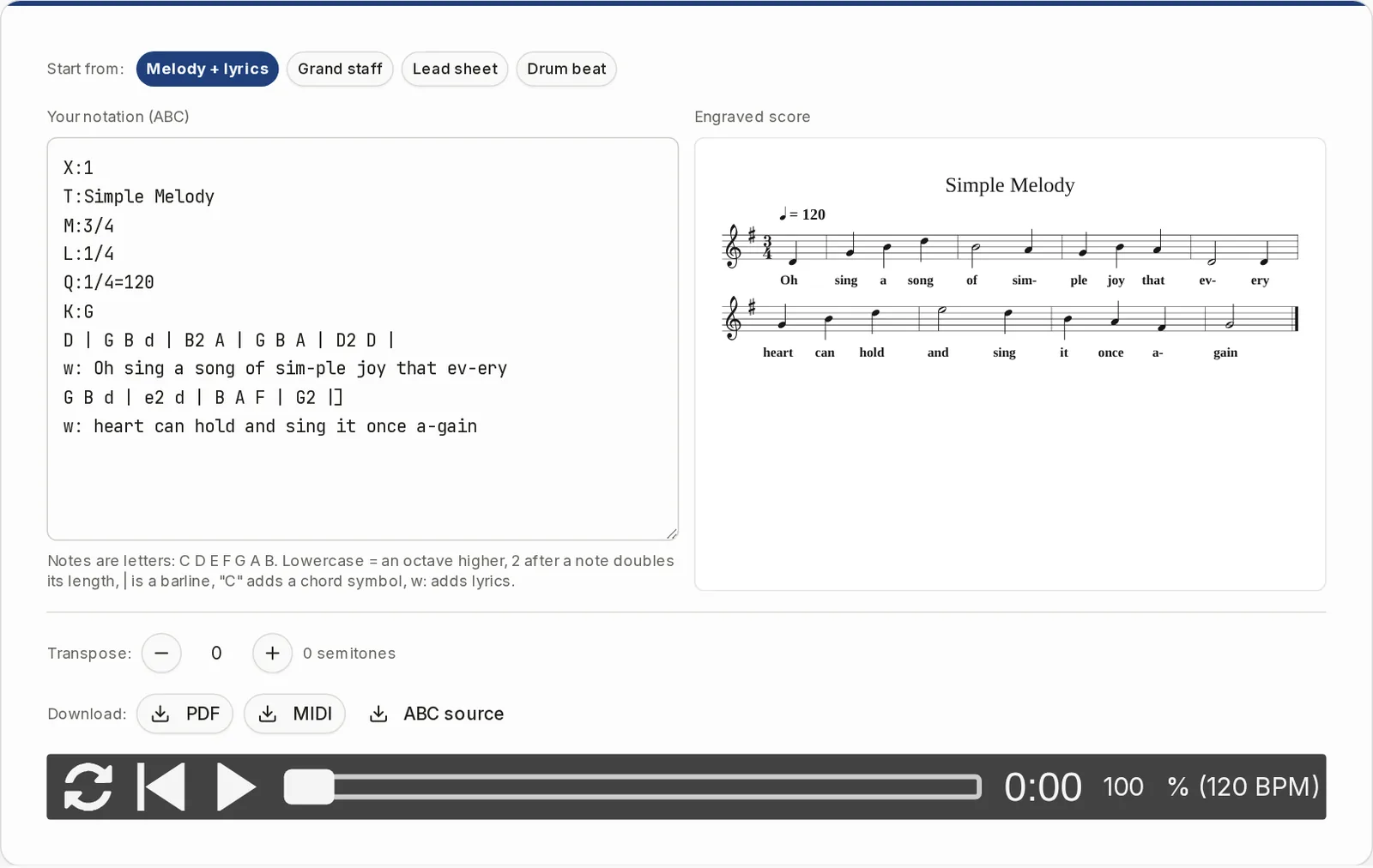
What typing a bar looks like
ABC notation writes music as plain text. Each note is a letter. This is the start of the Melody + lyrics template, in 3/4 and G major: D | G B d | B2 A | G B A | D2 D |
G B d is three quarter notes. The lowercase d is the D above. B2 is one B held twice as long. The | signs are bar lines. Put a line starting with w: under the tune and the words sit under the notes.
A few header lines come first: T: for the title, M: for the time signature, K: for the key. A chord symbol goes in quotes right before a note, like "Am".
Typing is the only way in. If a line has a typo, the editor draws what it can and lists up to four warnings under the text box, in English.
Lead sheet maker and drum notation, in the same editor
Two templates show what typed notation can do beyond a single melody line.
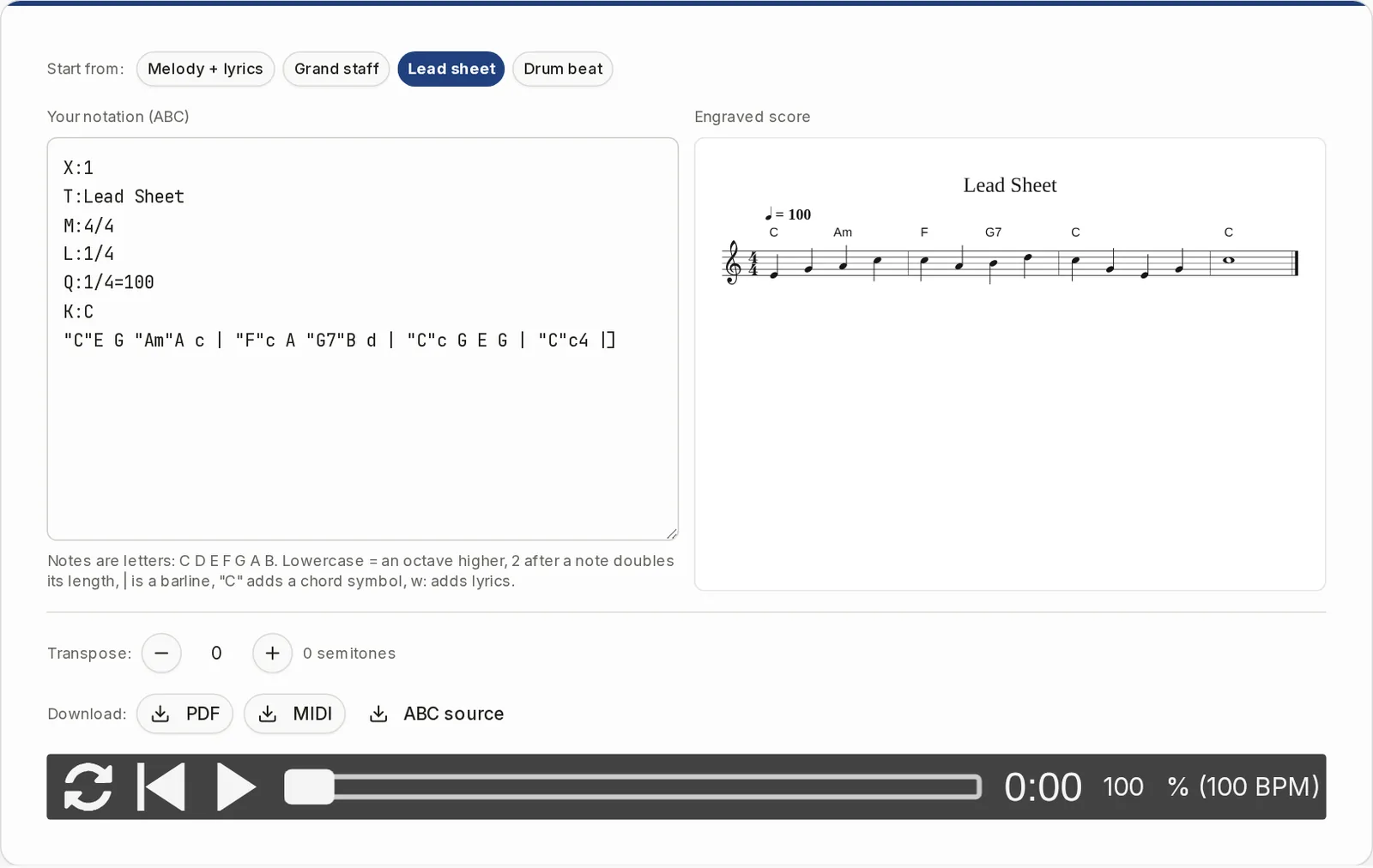
Lead sheets, and moving them to another key
Click Lead sheet for a melody with chord symbols above the staff. The Transpose buttons move the score one semitone per click, from -12 to +12, and Reset takes you back. The key signature, accidentals and chord symbols are rewritten: C, Am, F, G7 at +2 become D, Bm, G, A7. Playback, the MIDI file and the PDF follow the new key.
- The text in the box is not changed, and the ABC download is always as typed.
- Chord symbols use English note names: B is B natural, Bb is B flat.
- Semitone count only. There is no list of target keys or instruments.
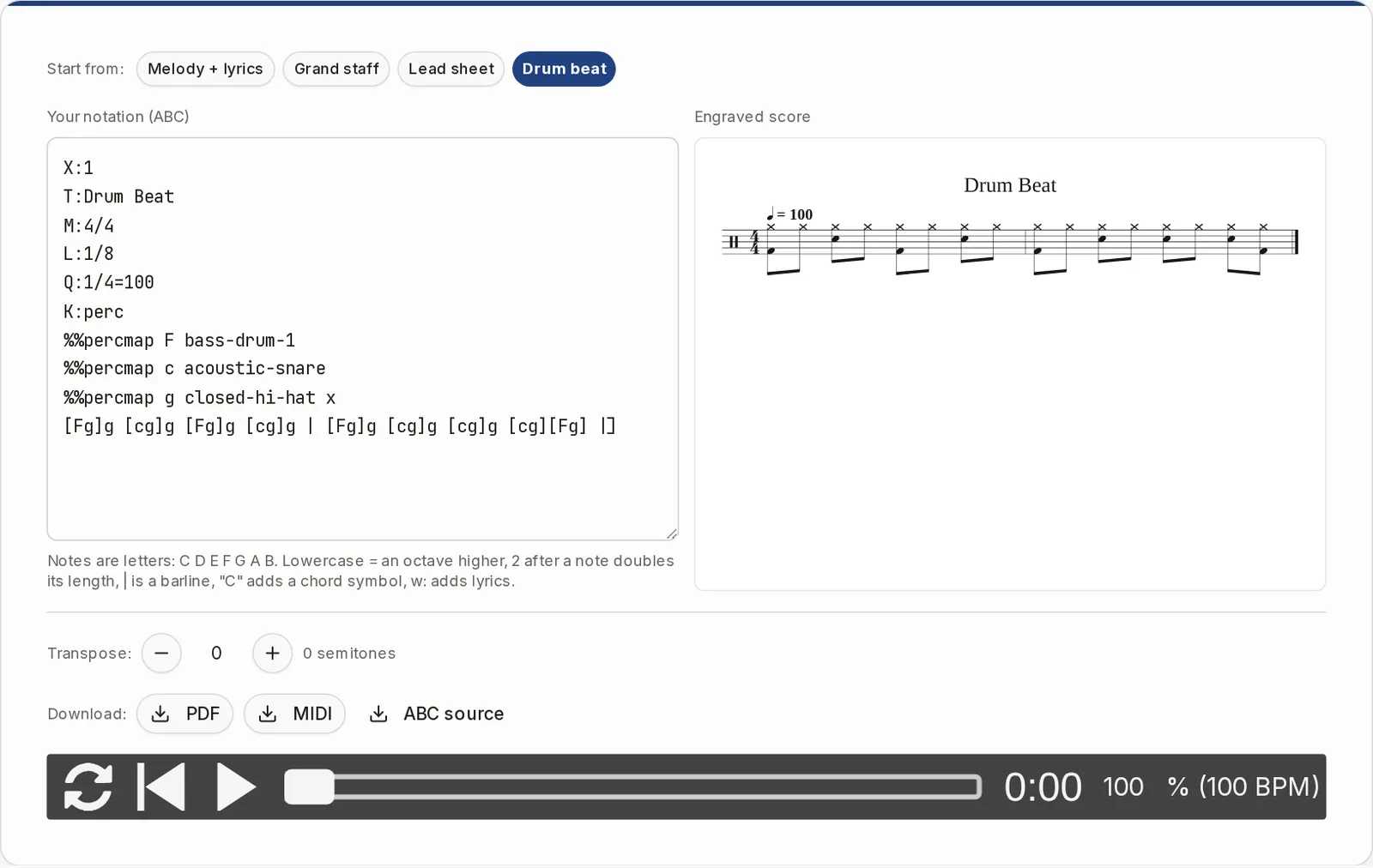
Drum notation from typed text
Click Drum beat for a percussion staff with bass drum, snare and closed hi-hat, with x noteheads on the hi-hat. The template maps letters to drum sounds in a few lines, and playback uses drum-kit sounds. Only the kit mapping in that template is shown here, and a percussion staff is not moved by the Transpose buttons.
- Every text line becomes one line of music.
- Several voices can sit on separate staves, such as treble and bass in the Grand staff template.
Is this the right kind of editor for you?
It does one thing: turn typed text into a score. Check the list before you start.
A good fit if you
- Want a tune, lead sheet or short piece on paper quickly
- Are fine typing notes as letters
- Want to hear a draft and print or download it
- Do not want an account or a subscription
Look elsewhere if you
- Want to click notes onto a staff or drag them
- Want to play notes in from a MIDI keyboard
- Need to open MusicXML, MIDI, PDF or files from other notation programs (there is no upload, only pasted ABC text)
- Need guitar tablature or chord diagrams
- Need saved scores, share links or work with others: nothing is saved, and a reload brings back the default template
- Work on big scores that need part extraction, several pieces in one file, or page and spacing controls
When you already have a file, a photo or a printed page
These pages cover what the editor does not.
Questions about music notation software
What is the best free music notation software?
It depends on how you want to enter notes. If you want to click notes onto a staff, look at a desktop program. If you are happy typing, this editor is free with no account, and the PDF has no watermark. It is built for tunes, lead sheets and short pieces, not for large scores.
Is this an alternative to MuseScore, Sibelius or Finale?
For a tune or a lead sheet, it can be. It cannot open their files, and it has no click entry, no page layout controls and no part extraction. We cannot speak for what other programs cost today, so check their own sites.
What is ABC notation?
A plain-text way to write music. Letters are notes, | is a bar line, and lines like T:, M: and K: set the title, meter and key. Because it is text, you can paste it anywhere and keep it in a file.
Can I write music without knowing ABC?
Start from a template and change one note at a time. The cheat sheet under the text box lists letters, octaves, note length, bar lines, chord symbols and lyrics. Check the warnings if nothing draws.
Can I open a MusicXML, MIDI or PDF file?
No. There is no upload button. You can paste ABC text into the box. For other formats, see the links above.
Can I use a MIDI keyboard?
No. The only input is typed or pasted text.
How do I keep my work?
Nothing is saved. A reload brings back the default template. Download the ABC source, and paste it back into the box next time.
Can I use it to compose music?
It is a place to write down your own music. It does not compose, harmonize or correct anything for you.
What can I download?
A PDF (A4 portrait, no watermark), a MIDI file with the notes, tempo and chord accompaniment, and the ABC source. There is no MusicXML, image or MP3 export.
Write your first bar
Pick a template, change a few letters and watch the score follow. Free, with no account.