

Free note name tool
Piano Sheet Music with Letters, Added to Your Own Score
Open a MusicXML or MIDI file and every note gets its name written underneath, in C D E, German names or Do Re Mi. Print it as a PDF, or copy the melody as plain letters.
- costFree, no account
- your fileStays in your browser
- downloadsPDF, MusicXML, TXT
Only have a PDF or a photo?Scan it to MusicXML first
The file is read in your browser and never uploaded. No account needed.
Piano sheet music with letters, without writing them in by hand
For anyone who can play a tune once they know which note is which.
I can't tell where the notes sit on the staff. I need the letter of every note written on my music.
Sheet music with letters
Open a MusicXML, MXL or MIDI file, or press Try an example. The score is drawn as normal staff notation with each note's name printed under it, in the treble and bass clef alike. Choose C D E, German (H) or Do Re Mi. You need a score file to start: there is no song library, and a PDF or photo has to be scanned first.
Letters can turn into a crutch, and they say nothing about rhythm. I want them only as help next to real notation.
Names under the staff
The staff, the note shapes and the rhythm stay on the page, and the names sit under the notes as a hint you can grow out of. This tool has no switch to hide them: if you want a version without letters, keep your original file.
How to add letters to sheet music
- 1
Open your score file
Choose a MusicXML, MXL or MIDI file, or drag it onto the box. No file yet? Press Try an example to see Ode to Joy.
- 2
Pick how notes are named
Under Note names, choose C D E, German (H) or Do Re Mi. Tick Octave numbers if you also want the octave. Both views update at once.
- 3
Print or save it
Download PDF for a printable copy, or MusicXML to keep working in another program.
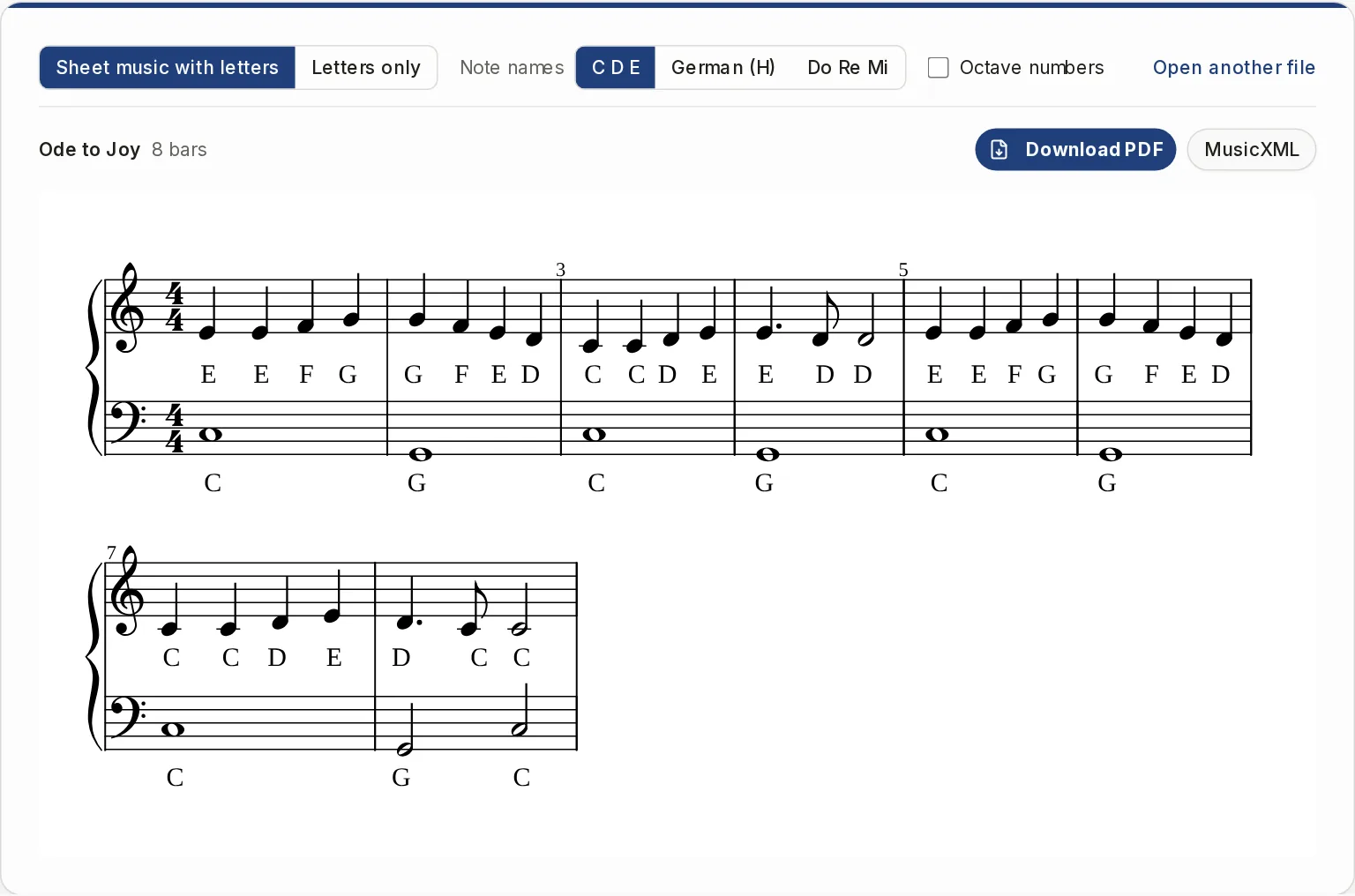
Two views of the same score
Use the one that fits how you practice.
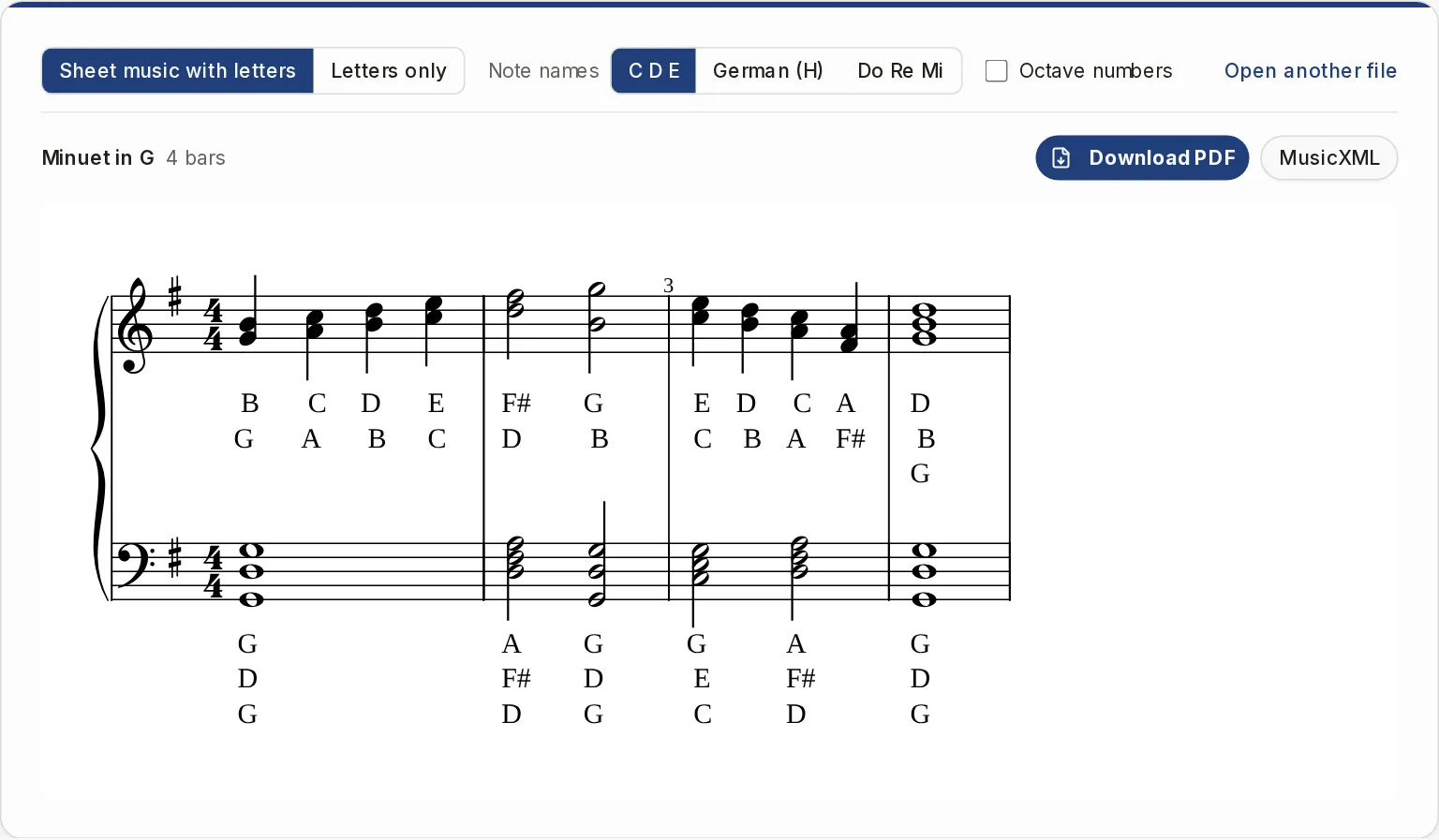
Chords get a name for every note
The view called Sheet music with letters draws every part and every staff. When several notes sound together, each one is named and the names are stacked under the chord, highest note first. Names follow the score's own spelling, so F sharp is F# and G flat is Gb.
- Tied notes are named once
- Rests and grace notes get no name
- Lyrics already in the file are removed so they do not collide with the names
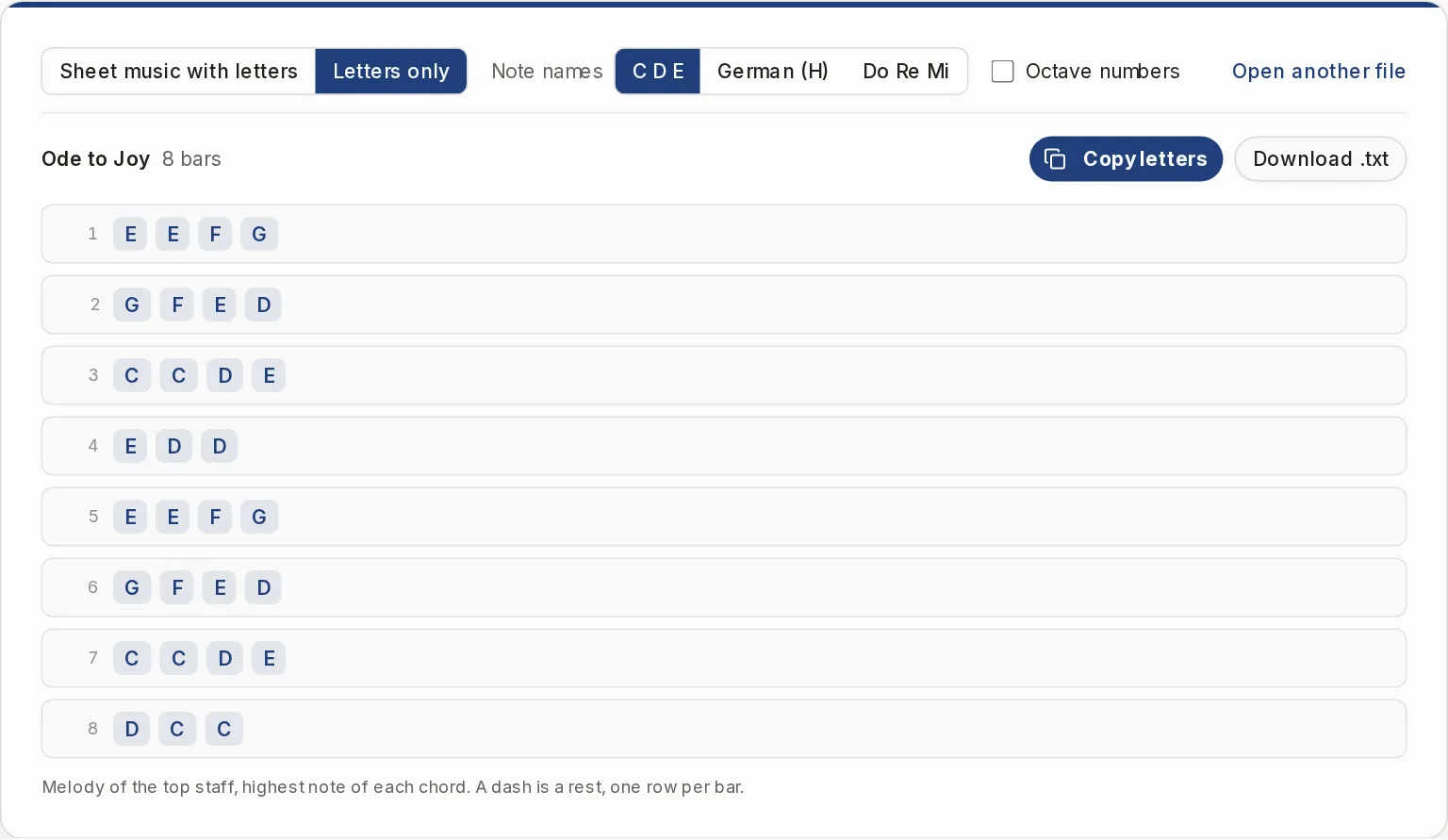
Letters only, one row per bar
Switch to Letters only to get the melody as plain text. Copy letters puts it on the clipboard as one line with bars separated by a bar sign, and Download .txt saves the same text. It is the top staff only, with the highest note of each chord, so it works as a cheat sheet next to the full score.
- A dash marks a rest
- No note lengths, so you need to know how the tune goes
Note names the way you learned them
Switch any time. The letters, the PDF and the text all follow your choice.
C D E
English letters C D E F G A B, with # for sharps and b for flats, like C# and Bb.
German (H)
H for B natural and B for B flat, Cis and Fis for sharps, Des, Es and As for flats.
Do Re Mi
Fixed do solfege: Do Re Mi Fa Sol La Si, with # and b.
Octave numbers
Adds the octave. With C D E and Do Re Mi, middle C is C4. With German names it is written c'.
Getting a good result from MIDI
A MIDI file has no notation in it, so the tool writes a piano score first, with a treble and a bass staff.
Use clean MIDI
A file exported from a notation program or a DAW reads well. A freely played recording without a click does not.
Expect rounded rhythm
Pitches are exact. Rhythm is snapped to a sixteenth-note grid and black keys are spelled from the key signature.
Prefer MusicXML when you have it
A MusicXML file keeps its own notation, so the names you get match the score you know.
What this page does not do
It does not offer ready-made lettered songs, and it cannot put letters inside the note heads. You bring the score file and the letters go under the notes. The PDF is A4 portrait made of images, so it is for printing, not editing. Nothing is saved, so reloading the page clears the result. Use it on music you own or have the right to use.
If you only have a PDF, a photo or a recording
This page starts from a score file. These tools get you to one, or do something else with it.
Sheet Music Scanner
Turn a photo or scan of one printed page into a MusicXML score you can open here. Needs sign-in and uses credits.
OpenPDF to MusicXML
Read a sheet music PDF page by page into one MusicXML file. Needs sign-in and uses credits.
Open
Questions about sheet music with letters
Can I get easy piano sheet music with letters for a song I pick?
Not from this page, because it has no song library. If you have the song as a MusicXML, MXL or MIDI file, it adds the letters for you. A printed page has to be scanned first.
Does it convert piano sheet music to letters as plain text?
Yes. The Letters only view lists the melody, one row per bar, and you can copy it or save it as a .txt file. It covers the top staff only and has no rhythm.
Can I print the result?
Yes. Download PDF gives you A4 portrait pages with a title on top. A long score runs over several pages.
Can I edit the labeled score afterwards?
Not here. Download MusicXML and open it in MuseScore, Sibelius, Finale or Dorico, with the names stored as a lyric line under the notes.
Is my file uploaded?
No. The file is read on your device. There is no account, no credits and no limit on file size or number of files.
Does it work on a phone?
Yes, it runs in a phone browser too.
Add the letters to your music
Open a score file, or press Try an example to see it work first.